NoBrokerHood Help Desk: From Complaint Handling to Experience Management
Most societies run smoothly not because there are fewer problems, but because there’s a system that quietly absorbs the chaos. From visitor entries to parcel rush hours, from festival permissions to maintenance follow-ups, gated communities juggle dozens of small moving parts daily. We see the help desk every day, but rarely tap into all the ways it can simplify community life.
On the NoBrokerHood app, every resident can log concerns, track resolution, acknowledge closures, and keep conversations structured. No missed calls. No lost context. No confusion. For MCs, it isn’t about managing complaints; it’s about managing the community experience. The tools are already live. The workflows are already set. Now it’s about making them second nature.
NoBrokerHood has always believed in having an Interactive Complaint Management software that serves both residents and managing committee members. Residents can raise issues, make suggestions, and stay informed through clear status visibility at every stage, ensuring they never lose track of their complaint progress.
On the other side, managing committee members gain structured oversight. They can review detailed reports, track staff performance, and identify recurring issues that need attention. And when a complaint remains unresolved, Automatic Escalation Policies ensure tickets move up the chain for faster resolutions. The result is transparency for residents and accountability for managing committee members, leading to higher satisfaction and trust within the community.
How does NoBrokerHood Help Desk Works?
1. Log in via the NoBrokerHood website
Managing committee members can sign in using the society credentials provided at the time of installation to access the society dashboard.
2. Open the Help Desk: Once on the dashboard, select ‘Help Desk’ from the left-side panel.
3. View and monitor resident complaints
Here, you can see all grievances raised by residents, along with their status — in progress, on hold, resolved, or closed.
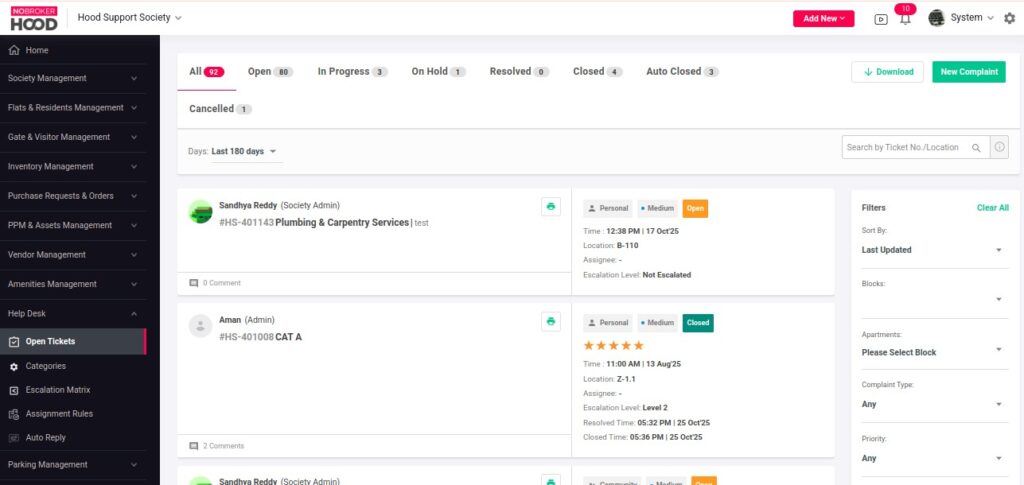
4. Check complaint history
To view older complaints, simply choose a date or month using the calendar filter on the top panel.
5. Add a new issue (if required)
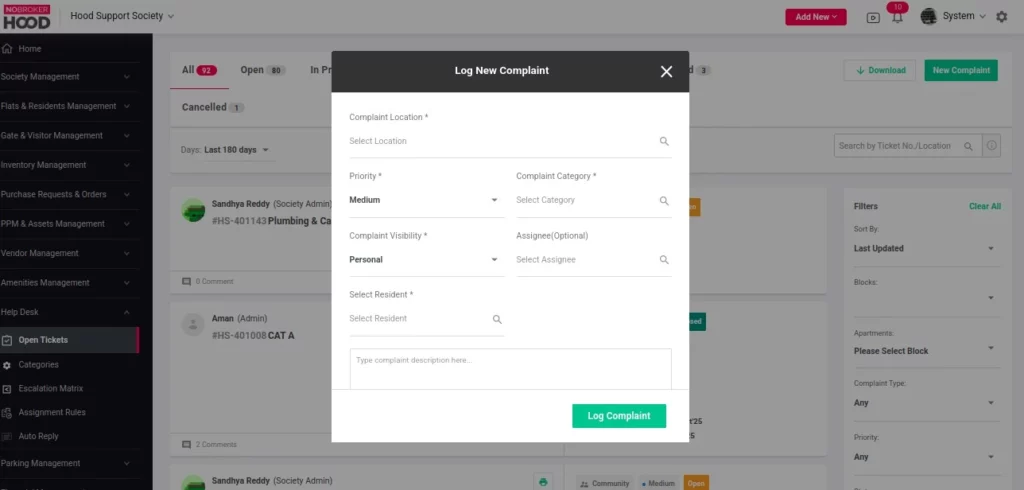
If you notice an issue within the society, click on ‘New Complaint’ in the top right corner.
6. Fill in the complaint details
Select the relevant:
- Complaint Category (e.g., plumbing, lift, parking, etc.)
- Issue Location (flat, block, or common area)
- Priority Level (high, medium, or low)
7. Add context and evidence
Provide more details in the Complaint Description box and attach images or documents if needed.
8. Submit the complaint
After entering all necessary information, click ‘Log Complaint’ to create the ticket.
With NoBrokerHood’s Help Desk, both residents and committee members can raise, track, and resolve society-related issues without stepping out of their homes.
In case you have any queries, reach out to us through the Request Assistance feature on the society management system NoBrokerHood resident app.
You can read more about Request Assistance here.